What's new in Properti: October 2026
21 October 2026
October was about two things: less setting up before a listing campaign goes live, and more to show your vendors once it does. Here's everything we shipped, best first.
1. Ready to run: your next campaign is already built
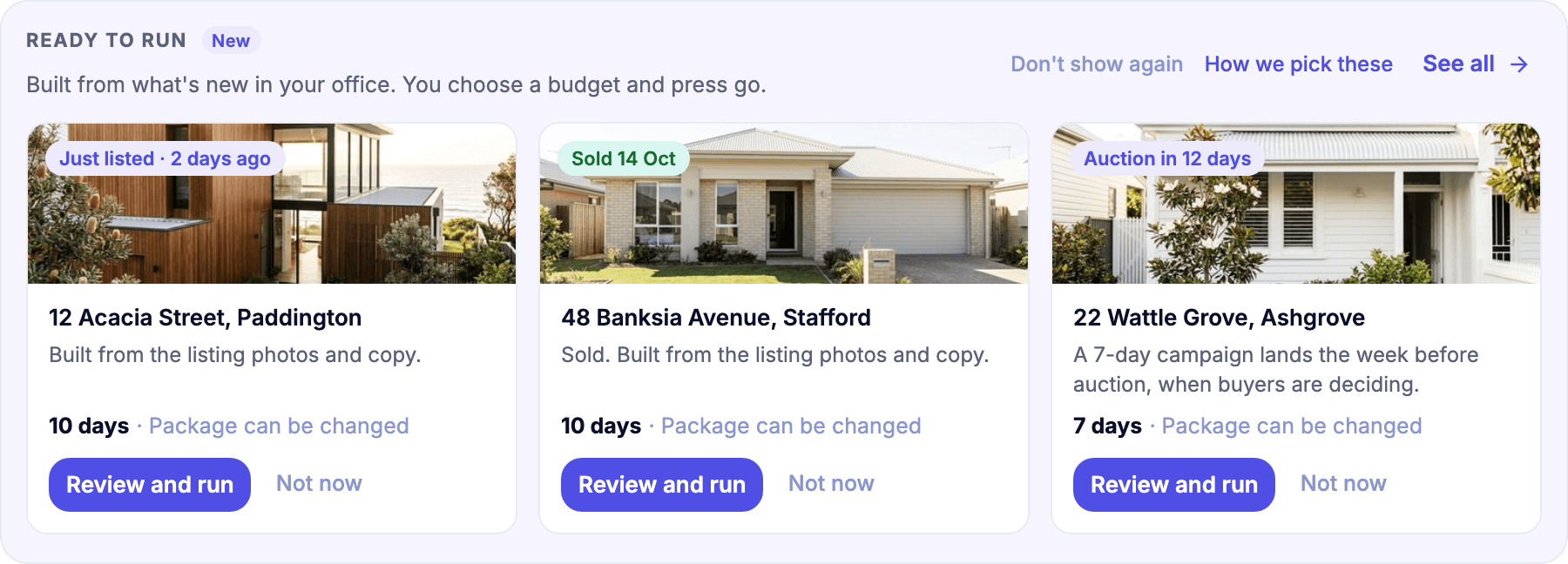
Open Properti and the Ready to run row on Home and Campaigns has listing campaigns waiting for you, built from your listing photos and copy: your newest listing, a recent sale and your next auction.
Choose Review and run and it's one screen. On one side, what people will see, with Meta and Google previews. On the other, the only thing left to decide: the package, budget and length together. Happy with it? Publish and run it. Not today? Save for later.

Review and run screen
Running a finished listing campaign again is now one button from your Campaigns list, and if your office hasn't run a campaign yet, the Campaigns page opens on your first one, built and waiting.
The full story: Ready to run: your next listing campaign is already built
2. Campaign breakdowns: know who your ads reached
Your campaign page now has a Breakdown tab for Meta and Google. See Meta results by age, gender, region, device and placement, and Google by region, device and network. Flick between a table and a chart, and export the lot to CSV for your vendor reports.
It works on any campaign running from 10 September 2026 onwards. If a campaign started before then, its breakdown covers the days from then on.

Campaign breakdown chart with Download CSV
How to: Break down your campaign results by audience and placement
3. Head office Ready to run: build once, every office runs it
If you run a network, head office can now build a Ready to run campaign once, from its own Creative library, set a suggested budget and length, and choose which offices get it, or offer it to all of them.
Each office sees it first in its Ready to run row, marked From head office. They check the preview, pick the suggested package or another, and run it. Offices can change the name, budget and dates. The creatives and audience stay exactly as head office set them, so the brand stays the brand. Each office pays for the campaigns it runs.

Head office Ready to Run campaigns
More on how it works: Built once by head office, run by every office
4. Bigger customer list audiences
You can now upload up to 75,000 contacts at once, up from 50,000. Mobile numbers with spaces now work, and Audiences shows how many rows Meta accepted plus Meta's own status, like Populating.

Audiences with rows Meta accepted
How to: Workspace: Audiences, Customer List
Also new
Refresh Analytics. Open a campaign, click Actions and choose Refresh Analytics to pull the last 7 days from Meta and Google again.
Cleaner campaign charts. Pick the metrics you want to compare on the Data tab and switch between chart and table.
Lead sync status. Leads shows whether each lead reached Rex or Agentbox, and lets you retry one that didn't. Works for leads from 2 September 2026.
Team notifications. Workspace admins choose which emails and inbox notifications each agent gets. How it works
Meta connection health. Apps > Meta shows at a glance whether publishing is working on your office page and which accounts need attention. Apps is for workspace admins.
Meta placements. Meta retired Messenger and Facebook Video Feeds as ad placements, so they're gone from your options.
LinkedIn captions. Creative library images and videos now show the creative's ad title under the post on LinkedIn, never a file name.
Already with Properti? It's all in your dashboard now. Not yet? Book a demo and we'll show you on your own listings.