What's new in Properti: November 2026
By Properti Team · Published 19 November 2026
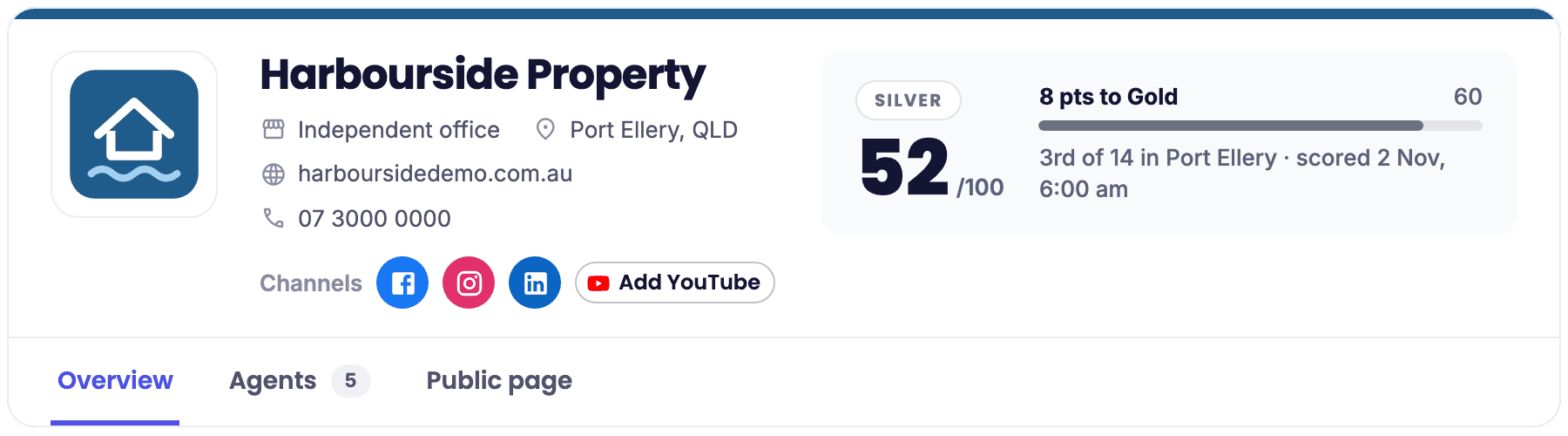
November was about making your listings loud: seen the way sellers see you, posted from day one, and sent out with your brand done right. Here's what's new, best first.
1. Grader: see your office the way sellers do
Grader is now inside Properti. It shows your office the way sellers see it on the Agent Grader: your agency score and tier, the score breakdown, and the next moves that lift it most. Some of those moves take you straight to Posts, Campaigns or Reviews.

Score breakdown and next moves on the Overview tab
Workspace admins also see every agent linked to your office with their score, can text an invite to any agent who hasn't claimed their profile, and can change what's on your public Grader page: office name, logo, brand colours, about text, phone, website and social links. Everyone else sees their own agent score and a link to claim their profile.
First time? A workspace admin clicks Link my office and pastes your office's realestate.com.au agency page address. Grader is for Australian offices with a realestate.com.au agency page, and it's not available on every plan.
The full story: See and fix what sellers see on your Agent Grader page
2. Your next listing, out there from day one
Haven't posted from Properti yet? Home and the Posts calendar now suggest a post from your newest listing, with its photos and copy already in. Click Schedule, pick where to post, check it, then choose Schedule Post. The suggestion goes away once your first post has gone out.

Suggested post from your newest listing on Home
A reminder: when it's time to promote it, your next campaign is already built. Campaigns for your newest listing, a recent sale or your next auction wait on Home and Campaigns, made from your listing photos and copy. Check the preview, pick a package and press Publish and run.
How to: Schedule your first post from a suggested listing
3. Review replies in your voice
Tell Properti how your office talks, and Generate with AI writes your Google review replies in that voice. In Reviews settings, turn on Brand voice for AI replies and describe your tone: how formal you are, phrases you like, words to avoid, how you sign off. You can still switch a single reply to Warm, Professional or Short, and you still approve every reply before it posts to Google.

Brand voice for AI replies in Reviews settings
Brand voice is part of Reviews Plus and works for Google review replies.
How to: Replying to reviews with AI
4. Your brand, filled in for you
Brand has moved under Studio and does more of the work. Paste your website and we fill in your logo, colours and contact details for you to check. Your listing links are tested against a real listing before they save, and the post message writer drafts new messages in our format from a short brief. You can upload your own font file now too.

Brand filled in from your website
Your workspace admin sets this up. Everyone else can look through Brand.
How to: Setting up your branding
Also new
Saved creatives moved. They now live in Library, under Studio.
Team invites in one place. On Team, add someone and send the invite when you're ready, then see whether it's not sent, sent, expired or active. Home also has a setup checklist with the next steps for your office, and agents get their own.
Know when a connection needs you. Apps now flags Google My Business, LinkedIn, Rex and Canva when they've stopped working, with a Reconnect button and a Reconnect step on your Home checklist. Apps is for workspace admins.
Google ad image shapes, up front. The Google step tells you which image shapes it needs, and warns you before you publish if your creative only has one vertical image.
Everything else we shipped: news.properti.ai
Already with Properti? It's all in your dashboard now. Not yet? Book a demo and we'll show you on your own listings.